- The Retail Solution 11.0
New General Features
 |
Windows 7 compatible! |
|
Latest mandatory credit card PCI/DSS updates. Updated PC-Charge interface. |
|
New interactive PDF manual with hyperlinks. Just click the links in the Table of Contents, Index, or cross-references ("see p. 24") to jump to that page! |
|
Larger screens, buttons and enhanced screen display. You can now customize button colors, and button text is now more consistent throughout the entire program. |
|
Enhanced network support. |
|
Integrated mouse wheel support. Navigating through reports, invoices, orders, past history and more has never been faster! |
|
Instant calculator can be accessed by double-clicking on most money fields. Values are automatically transferred to and from the calculator. Also includes a new running tape option. |
|
New Speed Date feature. At most date fields, press Enter for today’s date, enter just the day and the current month & year will be used automatically, or enter the month/day and the current year will be used automatically. |
|
Faster backups and updated CD-R/CD-RW support. |
|
Enhanced Data Import Wizard. New color-coding lets you view import status at a glance. Excel 2007 support. |
|
New TRS Picture Lab. Crop, adjust, zoom & auto size inventory, customer & employee pictures. |
New Inventory Control Features
|
Inventory recommended min/max values can now be set quarterly or monthly. |
|
New Smart Round feature. Automatically rounds a price level using preset user-definable price ranges. Example: $19.43 is automatically rounded to $19.49 but $1.34 would be rounded to $1.35. |
|
New automatic retail pricing option. Option to set one or more of the eight price levels, for a specific item, to be automatically recalculated when item cost is updated. |
|
Average cost now supports the last 5 or last 10 cost changes. Now also includes the order date and vendor for each change. |
|
Option to set an inventory item to always ask for the quantity at POS. |
|
Enhanced Inventory Movement. New drill down feature allows you to view all customers that purchased the item. You can even drill down further to view the actual ticket. |
|
New inventory buy X get Y option. Example: Buy 3 get 1 free or Buy 2 and get up to the next 5 at price level 3. This feature also supports buy X quantity at a reduced price. For example, only the first 3 are 20% off retail. |
|
More user-definable inventory data. You now have up to 10 fields and each field can be formatted as text, date, currency, number, check box or predefined drop-down list. |
|
Edit an entire inventory matrix simply by making a change to the matrix header. |
|
Enhanced Vendor screen. New vendor graph showing average sales and statistical trends to help negotiate better deals. New vendor note feature. |
|
Now tracks floor & warehouse bin locations for each inventory item. |
|
Enhanced Global Update. Loads faster, auto expands to your screen size, more filters, more fields and now supports simultaneous network access. The new user template feature allows you to quickly change viewed columns and the filters. The new right-click feature includes Column Search and Web Search. Column Search allows a user to scan any column for an item. Web Search allows you to quickly search for an item online using a predefined website. |
|
Updated Inventory Manager. Automatically compute min/max levels using enhanced forecasting models. Includes support for new seasonal items. |
|
Enhanced Create Order screen. Larger screen format. Tabs have been eliminated. The information you need to create an order, including an optional sales history graph, is now all on one screen. |
|
Enhanced Receive Order screen. Larger screen format. Tabs have been eliminated. The information you need to properly receive an order is now all on one screen. |
|
Option to lock retail price during receive order. |
|
Enhanced price & barcode label printing features. More fields have been added and the label design area has been expanded. Labels can now be exported to Excel, XML & CSV file formats. |
|
New Trade-in feature. Up to four different trade-in values based on product condition are displayed. Each trade-in value is automatically calculated based on the percentage of the original retail. Optional trade-in charges can be selected at the point-of-sale. Computes trade-in tax credit. Option to set percent of trade-in value that must be used or given as store credit. Current quantity on hand of the trade-in item is displayed. Option to hold trade-in item for verification before adding to inventory. Option to print barcode for trade-in item. |
|
Global sale prices by department now includes sub-departments and Smart Round |
|
New Global Warehouse transfer. Easily transfer items to and from the warehouse. |
New Point-of-Sales Features
|
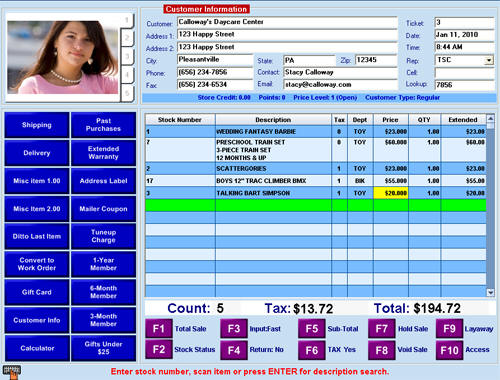
New preset & user-definable color themes. Fire, Green Forest, Blue Sky, Traditional or create your own theme! Let your POS screen reflect your store’s personality. |
|
New larger screen layout option. All POS buttons are now bigger for easier touch screen access. |
|
Enhanced Menu Buttons. Supports up to 18 user-definable buttons. Buttons now have two separate groups: Pre-sales & during the sale. Buttons can now access several Retail Solution functions. For example, re-print the last ticket, start a sale with a preset customer or ditto the last item. Customize button colors or add graphics. |
|
Multiple inventory description lines are now combined into one larger row.
Enhanced drawer closing feature. Credit/debit transactions can be displayed for verification. |
|
Option to apply a percentage of the deposit when a customer picks up a partial special order. |
|
Enhanced picture support. All five inventory item pictures are available to the picture window. Pictures can auto load as items are scanned. |
|
New Hardware Setup Wizard makes setting up a new POS station easer than ever. |
|
Updated startup pictures. Hundreds of new Seasonal, Smile & Funny graphics. |
|
Multiline comments are now combined as a group into one larger row. |
|
Option to display inspirational Bible verses in the picture window. |
|
Updated and enhanced Stock Status screen. Now shows full vendor's name, QTY on order, QTY on backorder and more. View the vendor’s website with just one keystroke. You can also add or edit pictures using the new TRS Picture Lab. |
|
New Tip option. Activates when purchasing a designated tip item. For example, salon services or dog grooming. The Retail Solution receives a credit card preauthorization, prints a predefined tip receipt, waits for the tip amount and then settles the credit card transaction with the tip. A tip report can easily be printed using the Report Writer. |
|
New Backup printer option. If your primary receipt printer is out of paper or off-line, the receipt will automatically be printed on an alternate receipt printer. |
|
New Smart Receipt feature. Specify, by station, what gets printed based on the payment type used to complete the sale. For example, an AR sale at the front register may print an invoice, but the back station may send an e-receipt. Set up to 3 different receipt options for each payment type. You can also set the minimum dollar amount for a credit card signature receipt to be printed. |
|
Auto sort invoice. Before printing the receipt or an invoice the sale can now be pre-sorted, making it much easier to locate items on the receipt. |
New Customers Features
|
Enhanced and updated screen layout. |
|
New field for customer cell number. Both address lines are now displayed. All customer information is available to the Report Writer. |
|
Enhanced count tracking. The “use count” item can now have an optional price, which will automatically charged if the customer’s current count is zero. For example, if a customer is out of tanning sessions, the retail price for the tan will be charged. |
|
User-definable data can now be formatted as; text, date, currency, number & check box. |
|
New option to combine two customers. Load the first customer, select the combine feature and then select the customer to combine. Past sales, layaways, accounts receivable, points, store credit and more will be combined into one account. |
New Employees Features
|
New employee rights. |
|
Use the new TRS Picture Lab to store an employee’s picture. |
|
Option to restrict the number of price levels an employee can view at POS. |
|
Birthday mode. When it’s an employee’s birthday, the graphic box in the upper left corner of the POS screen will wish them a Happy Birthday! |
New Accounting Features
|
Enhanced integrated checkbook. Checkbook entries are now all on one line. Now has unlimited split transactions. Takes advantage of your full-screen size. Integrated calculator support. |
|
Enhanced Bill Tracking. |
|
New credit card journal, bill paying option and reconciliation. |
|
New Vendor Types. Manage all vendors from the same screen. A new credit card vendor type has also been added. Credit card purchases are now tracked and can be used to pay other bills. |
|
Enhanced Quick View. Now includes sub-totals for each payment type. |
New Report Writer Features
|
New Report organizer. Reports can now be organized into color-coordinated groups. |
|
Faster! All reports now run substantially faster. |
|
More report sources & fields.
New column group headings and sub-headings. A group heading may span multiple columns with subheadings for each column. |
|
Column merge setting |
New Rentals Features
|
Master rental definition. Easily rent any inventory item using preset rental definitions. |
|
Rental ticket can now be placed on hold. |
|
All information for a rental item is now combined into one larger row on the invoice. |
|
Quick Copy. Use a Smart Ditto button in your Power Menu to quicky rent the same item again. For example, two adults renting a scuba tank. For the second adult, press 1 button and then select the serial number from the list. All settings from the previous rental would be applied. |
|
New Rent-to-own feature. User-definable set up fee, period before first payment, payment amount, duration, rental fees, pay off balance and more. Using integrated credit card support, you can batch process all weekly, biweekly, or monthly rent-to-own payments from one screen. |
Click here for Sample Screens
For more information or pricing call (541) 601-8282 Monday - Friday, 7AM - 4PM Pacific Standard Time or email

 Main Page Main Page
|